THE EQUATION PLAYGROUND
Change the equation.
Hear how it shapes a song.
Click the equation beside the graph to edit it, then Apply. Choose one of five full songs just underneath and press Play. The moving point reads the surface to shape brightness and stereo placement. Compare Original with Equation effect, or choose the built-in voice to explore pitch. Import your own music in Pocket for Android or Wave FX in your DAW.
LISTEN / FIVE FULL SONGS
Choose a song. Hear your shape.
Click a song below, press Play, then edit the equation beside the graph. Selection never starts playback automatically. Headphones reveal the stereo movement.
Psychedelic downtempo is ready. Press Play song to listen.
Full-length listening, not samples. One song loads at a time. No visitor uploads or processed-audio export. For your own tracks, use Wave FX in your DAW.
MORE SHAPES / SIX STARTING EQUATIONS
Choose a starting landscape.
Change a number. Bend the surface. Discover a new phrase.
Hear a ripple breathe. Change 3*r to 6*r for tighter rings and more frequent rises and falls.
What if we tried…
Ripple chamber: Hear a ripple breathe. Change 3*r to 6*r for tighter rings and more frequent rises and falls.
Multiply every height by 0.7. Positive peaks lower; negative valleys become shallower. Display limits may hide some changes.
Sample x, y and r at 1.25× their coordinates: rings pack closer, hills narrow, and saddles become steeper. This is a spatial rescaling, not a pitch control.
Replace t with 0.5*t. The equation evolves at half its rate; the listening path and song playback speed stay unchanged.
Replace t with -t. Traveling motion reverses. Time-symmetric shapes, such as cos(t), can look exactly the same.
A few symbols. Endless directions.
x, y are positions across the grid; r is distance from the center; t is time. Try sin(x + t) * cos(y). Replace x with 3*x to add more waves.
Use +, −, *, /, ^, parentheses, pi, e, sin, cos, tan, abs, sqrt, exp, log (natural), min, and max. Implicit multiplication works: 2x and 3sin(r). Trig angles apply when you press Apply. Presets start in radians.
This demo plots x and y from −3.05 to 3.05. Displayed height is limited to ±3 after Surface depth; undefined points leave gaps and mute the equation effect. Original bypass keeps the source audible. This is a creative sound mapping, not the sound of a physical phenomenon.
Explore without gesturesRead coordinates · inspect a slice · listen to its shapeOpen +
Listening source: Psychedelic downtempo. Song mode changes brightness and stereo, not the recording’s pitch. To process your own instruments and recordings, use Wave FX in your DAW.
WHAT THE DOWNLOADABLE VST3 ADDS
One equation here.
A complete sound-design system in your DAW.
The playground is a focused introduction. Wave FX takes the same connection between shape and sound into Ableton, where it can transform the instruments and recordings that are already yours.
Explore Wave FX beta →- 8 equation layersChoose one or combine them into a living surface.
- Material paintingGive every color its own tone, pitch, stereo, mix, and level.
- Incoming-audio processingTransform Ableton instruments, samples, vocals, and recordings.
- Original + Graph mixingBlend the two paths independently; add Graph EQ and up to four orbit points on your input track.
- Headphone spatial soundMove the result with stereo and binaural positioning.
- 30 starting pointsExplore 24 surfaces and six sound-character presets.
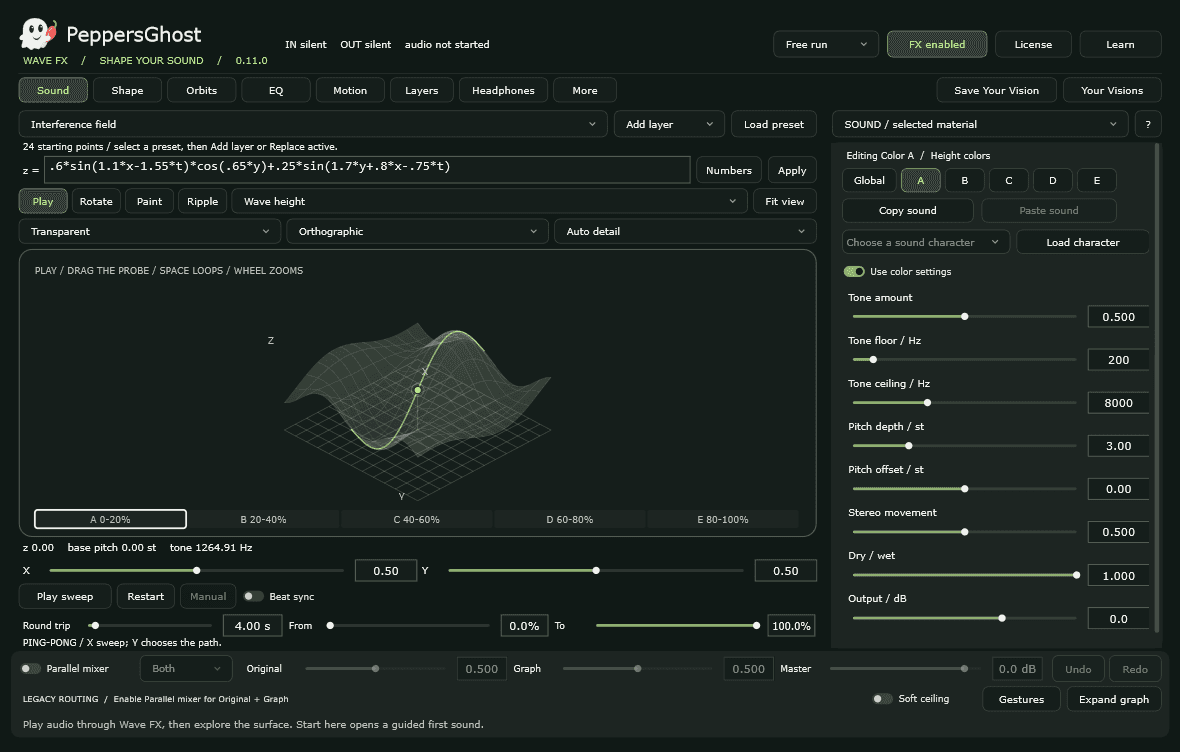
Move from one browser equation to layered surfaces, painted sound materials, performance gestures, modulation, and spatial motion inside a native Windows VST3 audio effect.
See the complete interface tour →Follow the point. Hear the relationship.
On a song, climbing the surface opens the filter and brightens the tone; descending darkens it. The point’s left/right position moves the sound between your ears. Song mode does not shift the recording’s pitch. The built-in voice adds a height-to-pitch mapping. Pause animation to hold the effect while the song continues; pause the song to stop listening. Adjust depth and speed to explore its character.
Explore here. Create with your own audio in Ableton.
This playground offers five full-length WAV songs and a built-in equation voice, but does not accept visitor audio uploads. It interprets one equation at a time and does not export processed audio. Use the native Wave FX to transform your own instruments and recordings with equation layers, sound-material painting, incoming-audio pitch processing, and binaural effects.
Explore the native workflow →